Lock Screen access
See countdown progress from the screen you check before unlocking.
Lock Screen widget
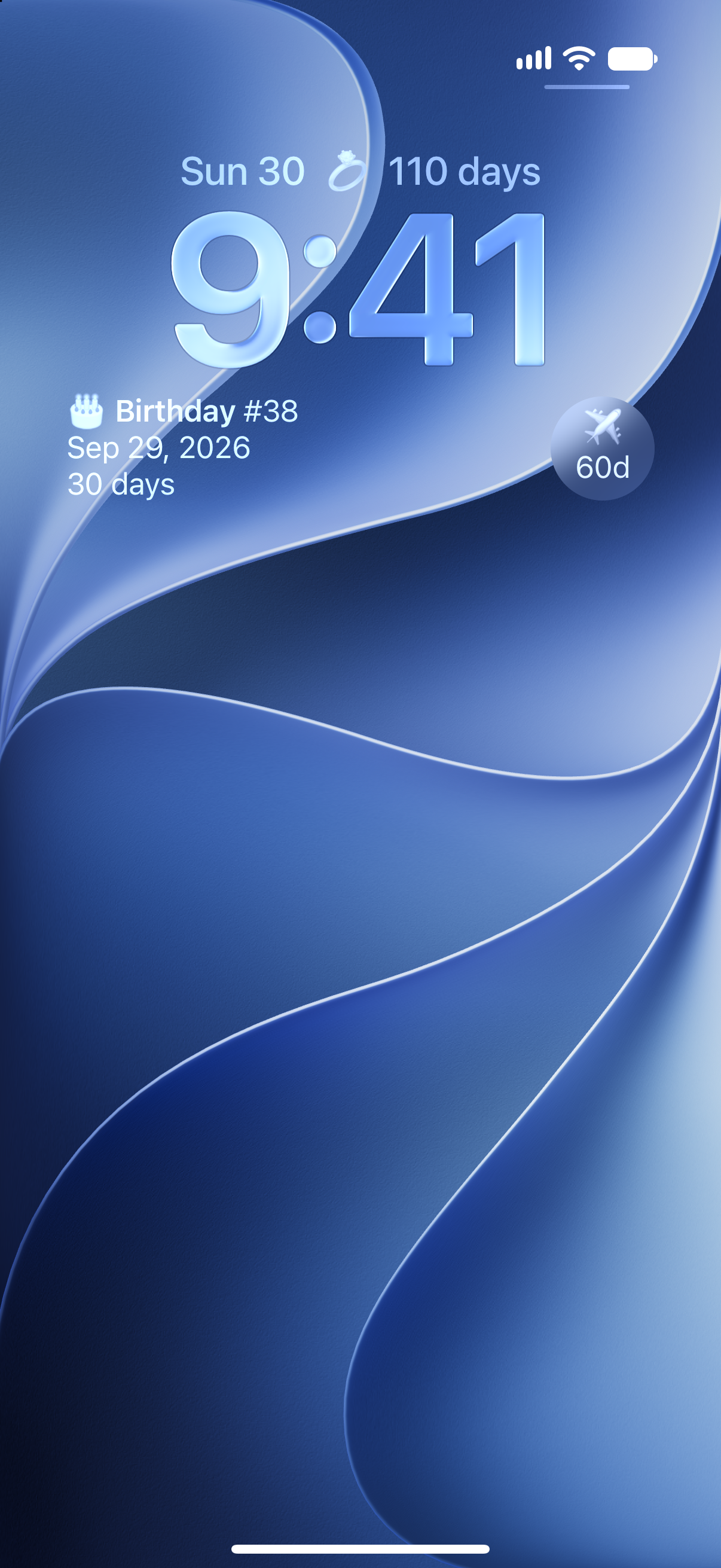
Put countdowns on your iPhone Lock Screen so the next trip, birthday, holiday, deadline, or milestone is visible at a glance.

Why it helps
See countdown progress from the screen you check before unlocking.
Use Lock Screen widgets for travel, deadlines, event days, and near-term plans.
Create the countdown once, then display it in the places that help most.
Lock Screen widgets are especially helpful when a date is close enough that you want to check it often. A trip, game, birthday, event, or deadline can stay visible without opening Countdowns or scanning your calendar.
Use the app to create and customize the countdown, then pick the widget that fits your Lock Screen layout.
Some countdowns belong on both screens. Put a near-term date on the Lock Screen for quick checks, and keep longer-term countdowns or lists on the Home Screen.
How to use it
Start with the date, then make the timer useful everywhere you check your day.
FAQ
Yes. Countdowns supports Lock Screen widgets for quick progress checks.
Lock Screen widgets are best for dates you want to check often, such as trips, deadlines, birthdays, and events.
Yes. Countdowns supports both Home Screen and Lock Screen widgets.
Start counting
Download Countdowns and add a Lock Screen widget for the events that matter most.