Home Screen visibility
Keep favorite countdowns next to the apps you already open every day.
iPhone widget
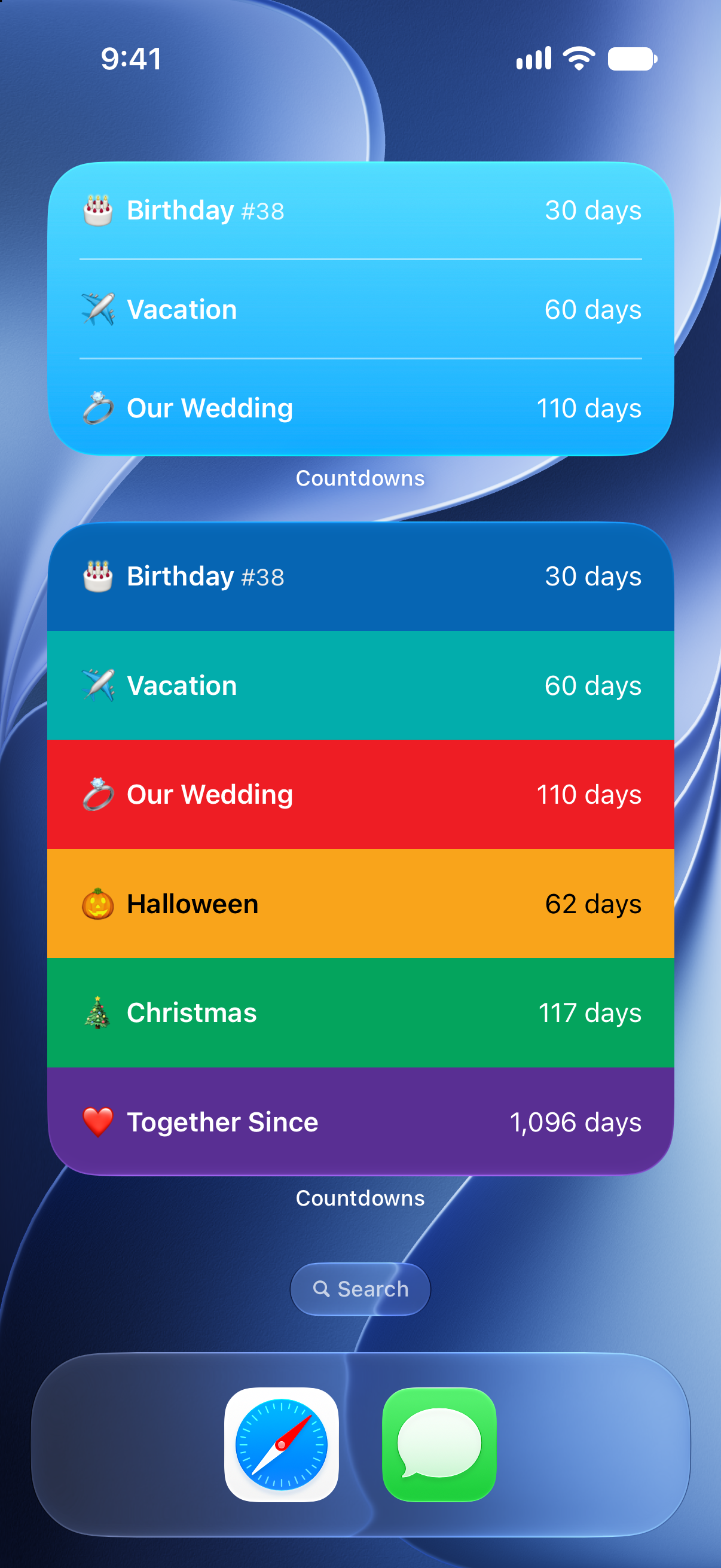
Add countdowns to your iPhone Home Screen so birthdays, trips, weddings, deadlines, and milestones stay easy to see.

Why it helps
Keep favorite countdowns next to the apps you already open every day.
Show weddings, vacations, birthdays, holidays, games, deadlines, and more.
Choose units, colors, and lists so each widget is easy to understand.
An event countdown is most useful when it is visible. With an iPhone countdown widget, you can see the remaining time without opening the app or searching through a calendar.
Use widgets for the dates that are fun to watch and the dates you do not want to forget. A birthday, flight, wedding, race, school deadline, launch, or holiday can all have its own place on the Home Screen.
If you track several events, organize them into lists and choose which countdowns deserve Home Screen space. Keep the most important date visible and use the app for the full set.
How to use it
Start with the date, then make the timer useful everywhere you check your day.
FAQ
Yes. You can add widgets for different countdowns or lists.
Yes. Use widgets for birthdays, trips, weddings, deadlines, holidays, and other events.
Countdowns lets you customize the countdown itself with units, colors, icons, lists, and more.
Start counting
Download Countdowns and keep the dates you care about where you can see them.